Note: This UI for this concept was developed and worked on before Apple came out with their Update for 27, where Siri may appear similar in visual language.
Closing the Gulf of Execution: Designing AI Interfaces That Understand Intent
Feb 1, 2026
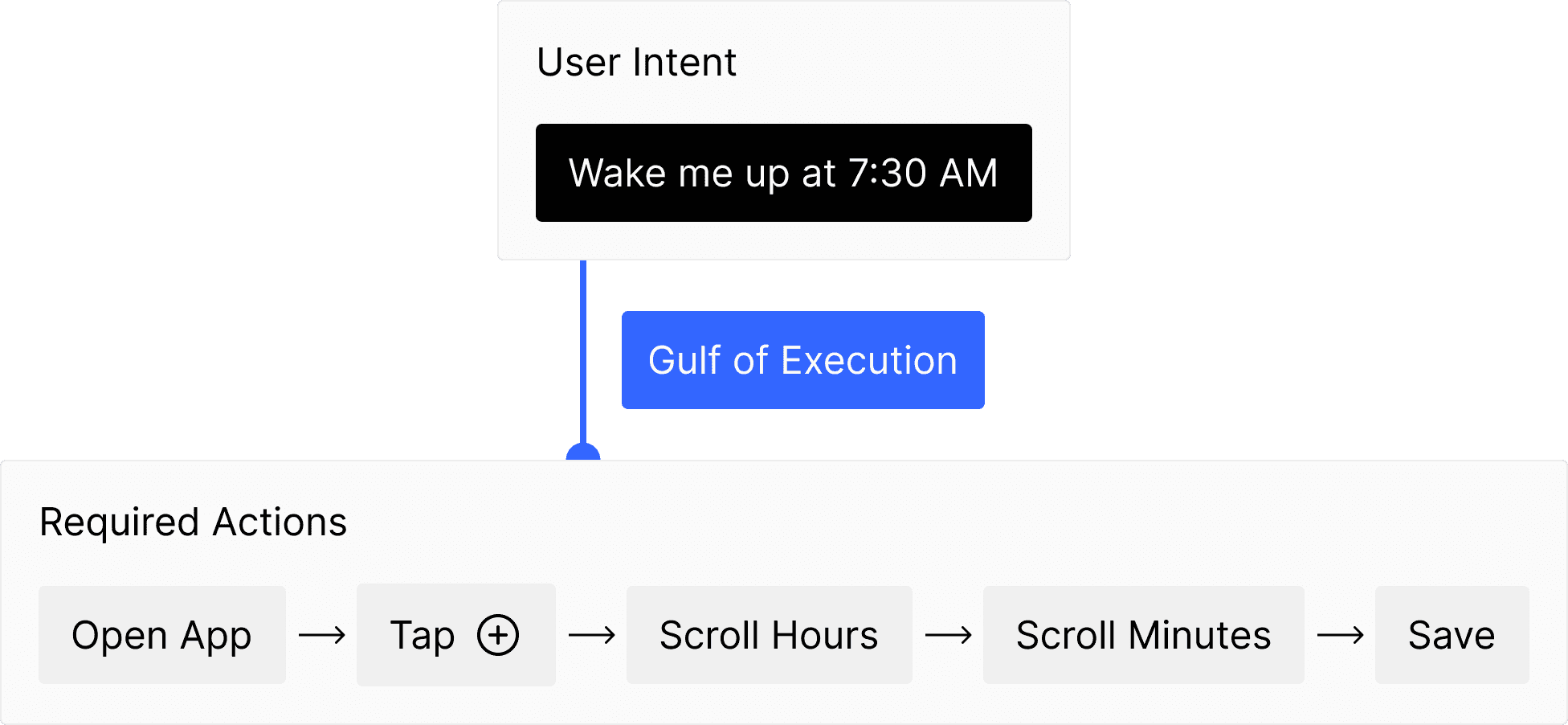
I've been experimenting with a concept in psychology called the "Gulf of Execution." It's a simple frustration most people experience every day without realizing it: the gap between what you want to do and the steps required to actually do it.
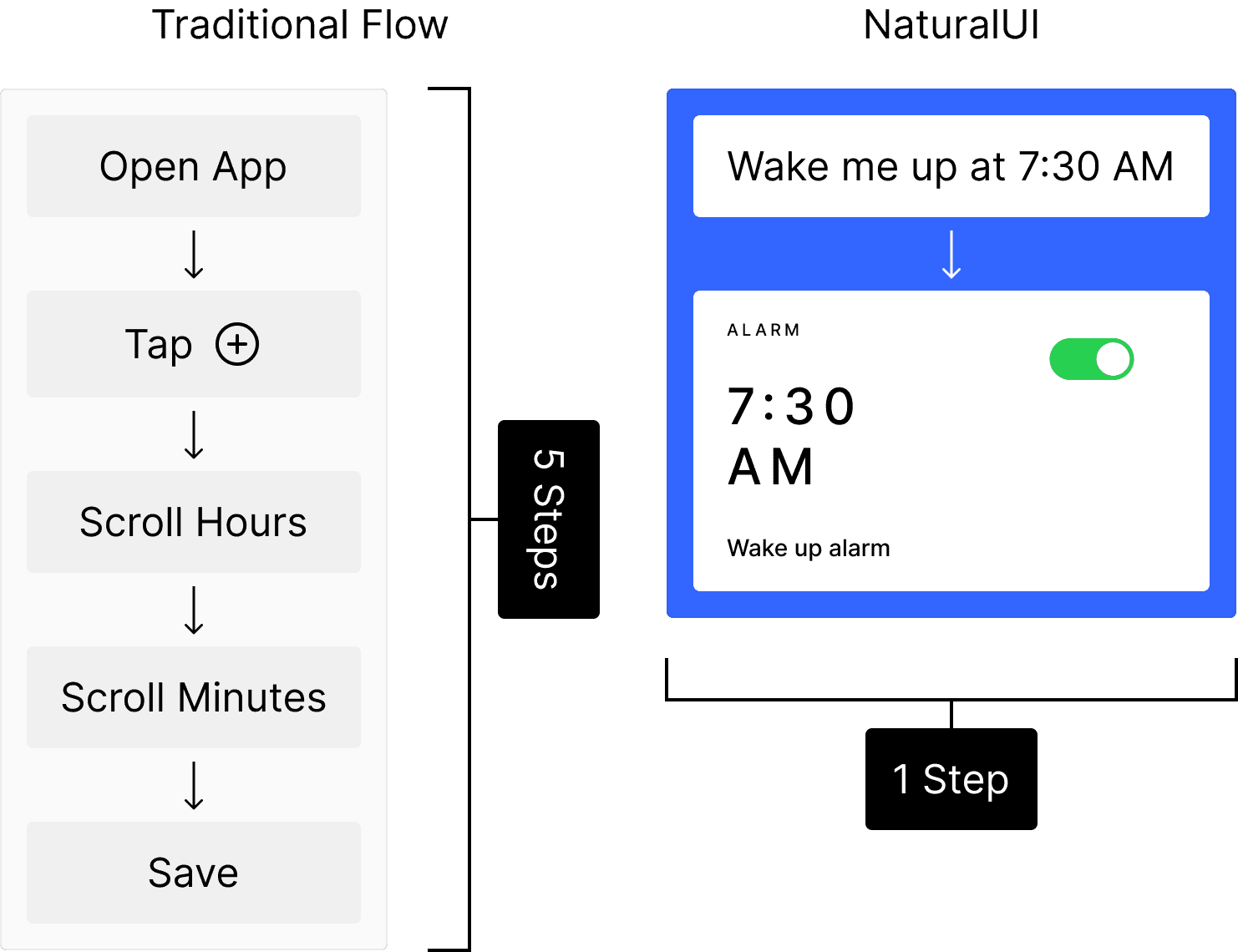
If you want to set an alarm, your goal is simply "Wake me up at 7:30 a.m. from Mondays to Fridays" But the execution involves opening the Clock app, tapping plus, scrolling through hours, scrolling through minutes, selecting the days of the week and hitting save. That gap between intent and action is where friction lives, and it's where a lot of unnecessary complexity in software comes from.
I built a prototype called NaturalUI to explore whether we could close that gap using generative AI. The idea is to shift from telling the computer how to do something, step by step, to simply telling it what you want.
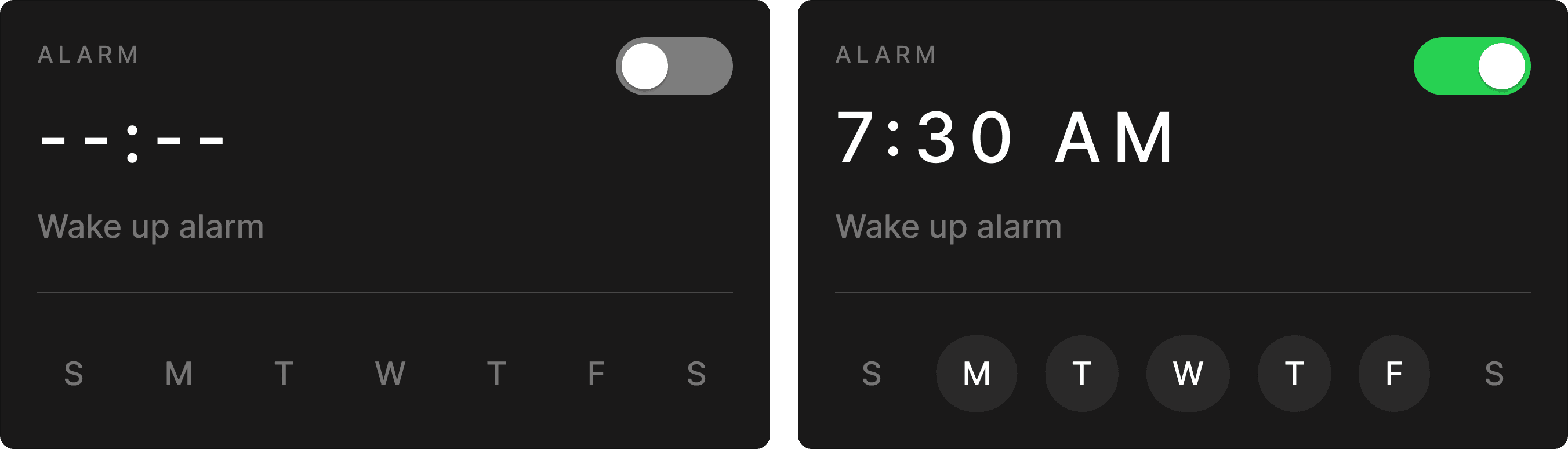
The UI changes as you type in the prompt.
The Psychology Behind the Problem
The term "Gulf of Execution" comes from cognitive psychologist Donald Norman's research on how people interact with technology. It describes the mental effort required to translate a goal into the specific actions an interface demands. The wider this gulf, the more frustrating the experience.
Traditional interfaces are built around commands. They require you to learn where things are, remember navigation paths, and execute precise sequences. For simple tasks this works fine. But as software grows more complex, the gulf widens, and you end up spending more time navigating than actually accomplishing anything.
Three Principles at Work
Reducing Cognitive Load
NaturalUI has no menus, no sidebar, no dashboard. The interface is what I call "liquid." It has no shape until you give it a purpose. As you type your intent, the interface materializes around your need. This removes the "Blank Slate Problem," where traditional apps confront you with an array of options before you can even begin your task.
Visualizing Confidence
One of the biggest psychological hurdles with AI is trust. You never quite know if it understood you. In this prototype, when the AI is still parsing your intent, the UI renders as a blurry, semi-transparent ghost. As your input clarifies, the interface sharpens into focus. This mimics how understanding actually works, fuzzy at first, then clear. It gives you continuous feedback without throwing error messages or leaving you guessing.
Matching Scale to Intent
The interface adapts its size and complexity to match what you're asking for. A simple calculation gets a small widget. A request to write a blog post expands into a full writing environment. The system doesn't force you into a one-size-fits-all layout.
The Honest Limitation
Here is where we need to be straightforward. This concept is not practical to build at full scale right now.
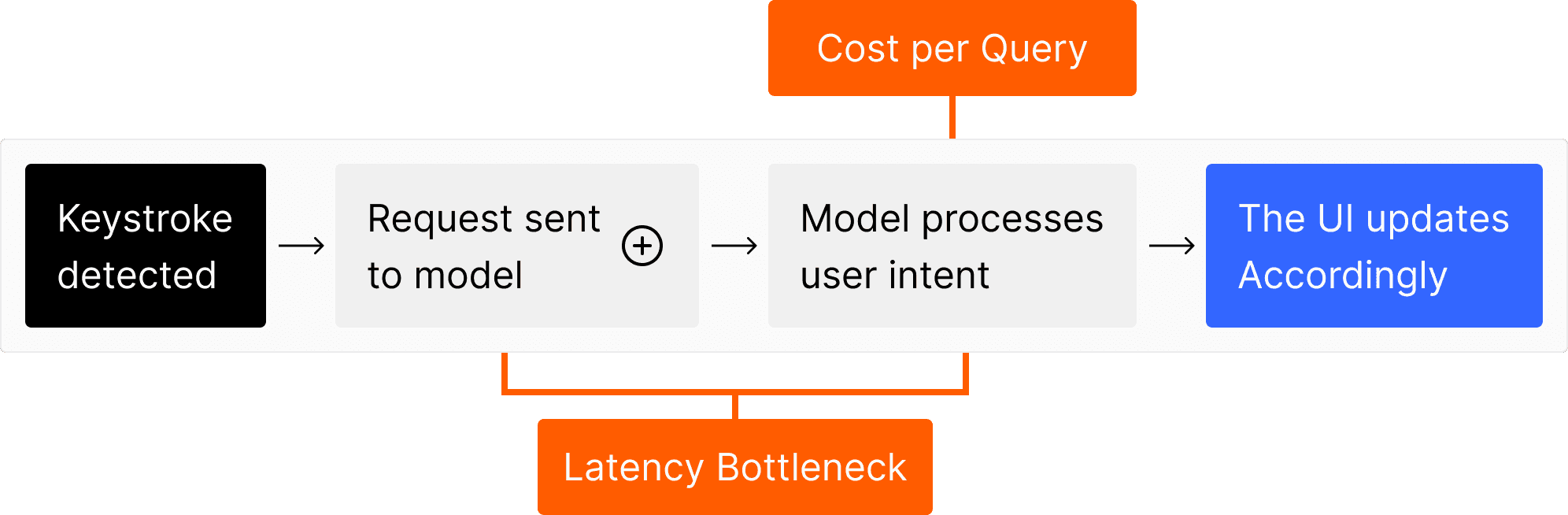
Every keystroke would require querying a language model to interpret intent and update the interface in real time. Current AI models, even fast ones, introduce latency that would make this feel sluggish. And the cost per API call makes real-time inference at this frequency economically unreasonable for most applications. If every user is generating dozens of AI queries per minute just by typing, the infrastructure costs would be substantial.
AI inference is getting faster and cheaper every year, so this may become viable in the future. But today, it does not add up.
Where it could Actually work Now
The most realistic near-term application would be something like macOS Spotlight or a similar system-level search interface.
Instead of generating entire interfaces from scratch, the AI could work with a library of pre-built widgets. The alarm widget already exists as a template. The AI parses your natural language, extracts the relevant details (time, repeat days, label), and populates the widget with that data. This cuts down the computational load significantly because the system is not creating UI from nothing. It is doing intelligent form-filling with existing components.
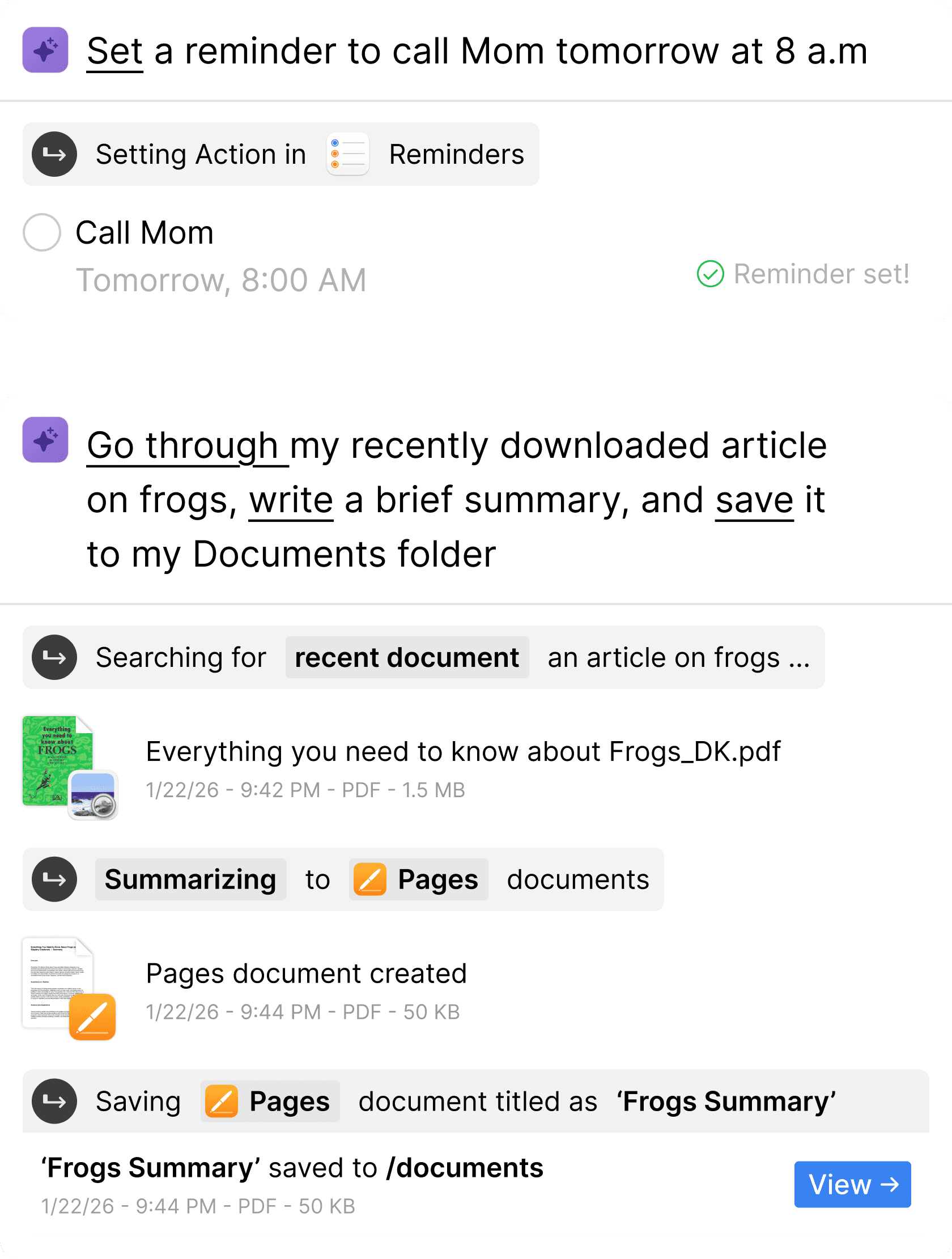
I designed a 'hypothetical' spotlight workflow using the earlier concepts/features.
You type "Wake me up at 7:30 a.m." and instead of just seeing the Clock app icon in your search results, you see a fully populated alarm widget ready to confirm with one keystroke. The gulf between intent and execution shrinks to almost nothing.
Why This Matters
This approach draws on well-established psychological principles. Recognition over recall, meaning the interface shows you something to confirm rather than forcing you to remember where things are. Reduced decision fatigue, since traditional interfaces often present unnecessary choices before you can start your actual task. And immediate feedback, which builds confidence that the system understands what you are asking for.
NaturalUI is a prototype, and replacing traditional operating systems entirely is not the goal. Some tasks, graphic design, video editing, precise configuration, genuinely benefit from direct manipulation and hands-on control.
But for the everyday tasks that make up most of what people do on their computers, the gulf between what they want and what they have to do is wider than it needs to be. The interesting design question is not whether we can eliminate that gap entirely. It is how much of it we can close, right now, with the tools available to us.
Try it for yourself
Last updated March 2026